From 74a67a1841d8ee094637b5dcc9704847484b1b0a Mon Sep 17 00:00:00 2001
From: abel <71026016+ableTI@users.noreply.github.com>
Date: Fri, 3 May 2024 12:41:34 +0200
Subject: Add files via upload
---
.../CC6-1203SR-E/EAGLE/CC6-1203SR-E.lbr | 188 +++++++++++++++++++++
.../CC6-1203SR-E/EAGLE/Readme.html | 35 ++++
2 files changed, 223 insertions(+)
create mode 100644 pcb/cc6/LIB_CC6-1203SR-E/CC6-1203SR-E/EAGLE/CC6-1203SR-E.lbr
create mode 100644 pcb/cc6/LIB_CC6-1203SR-E/CC6-1203SR-E/EAGLE/Readme.html
(limited to 'pcb/cc6/LIB_CC6-1203SR-E/CC6-1203SR-E/EAGLE')
diff --git a/pcb/cc6/LIB_CC6-1203SR-E/CC6-1203SR-E/EAGLE/CC6-1203SR-E.lbr b/pcb/cc6/LIB_CC6-1203SR-E/CC6-1203SR-E/EAGLE/CC6-1203SR-E.lbr
new file mode 100644
index 0000000..1a97ec9
--- /dev/null
+++ b/pcb/cc6/LIB_CC6-1203SR-E/CC6-1203SR-E/EAGLE/CC6-1203SR-E.lbr
@@ -0,0 +1,188 @@
+
+
+
+
+
+
+
+
+
+
+
+
+
+
+
+
+
+
+
+
+
+
+
+
+
+
+
+
+
+
+
+
+
+
+
+
+
+
+
+
+
+
+
+
+
+
+
+
+
+
+
+
+
+
+
+
+
+
+
+<DC-DC Converters, On-board type, Output: 3.96W, 3.3V, Isolated type, Option: SMD type</b><p>
+<author>Created by SamacSys</author>
+
+
+<b>CC6-0512SR-E-4</b><br>
+
+
+
+
+
+
+
+
+>NAME
+>VALUE
+
+
+
+
+
+
+
+
+
+
+
+
+
+
+
+
+
+
+
+
+
+
+
+
+
+
+
+
+
+
+
+
+
+
+
+
+
+
+
+
+
+
+
+
+
+
+
+
+
+
+
+
+
+
+
+
+
+
+
+
+
+
+
+
+
+
+>NAME
+>VALUE
+
+
+
+
+
+
+
+
+
+
+
+<b>DC-DC Converters, On-board type, Output: 3.96W, 3.3V, Isolated type, Option: SMD type</b><p>
+Source: <a href="https://product.tdk.com/system/files/dam/doc/product/power/switching-power/dc-dc-converter/catalog/cc-e_e.pdf"> Datasheet </a>
+
+
+
+
+
+
+
+
+
+
+
+
+
+
+
+
+
+
+
+
+
+
+
+
+
+
+
+
+
+
+
+
+
diff --git a/pcb/cc6/LIB_CC6-1203SR-E/CC6-1203SR-E/EAGLE/Readme.html b/pcb/cc6/LIB_CC6-1203SR-E/CC6-1203SR-E/EAGLE/Readme.html
new file mode 100644
index 0000000..833b90c
--- /dev/null
+++ b/pcb/cc6/LIB_CC6-1203SR-E/CC6-1203SR-E/EAGLE/Readme.html
@@ -0,0 +1,35 @@
+
+
+
+ Instructions for schematic symbols and footprints
+
+
+
+
+How to use the Schematic Symbols and PCB Footprints:
+
+First Time:
+
+The PCB Part Libraries require FREE software to convert them into EAGLE Format.
+
+To get started please visit - EAGLE.componentsearchengine.com/pcb-libraries.php
+
+Subsequent Times:
+
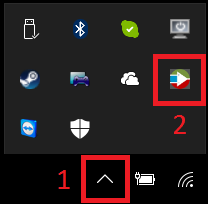
+Make sure 'Library Loader' is running on your PC.
+
+
+
+If not launch it from the desktop shortcut: 
+
+After downloading the Schematic Symbol & PCB Footprint zip, check in your ECAD tool. The libraries will have been loaded automatically.
+
+For further help please visit - www.samacsys.com/eagle/
+
+------------------------------------------------------------------------------------------------------------------------------------------------
+
+Alternatively, please try out our new EAGLE Plugin
+
+For help installing and using the EAGLE Plugin please visit - www.samacsys.com/eagle-library/
+
+
--
cgit v1.2.3